Founding Member Offer: Get InQ Ledger for $99/yr — locked in forever. Use code FOUNDER at checkout. Learn more →
№ 01 — The motto

Books built
for taxes.

InQ Ledger ships a chart of accounts that mirrors your tax return — line for line. Pick S-Corp, you get 1120-S. Pick Sole Prop, you get Schedule C. April becomes a transfer of numbers, not a translation project.

Try free · book a demo
Fully offline Local SQLite Unlimited company files 30-day money back
Annual
$199/yr
Best value
Monthly
$20/mo
Flex
Platform
Windows 10 / 11
Desktop
Migrating?
QuickBooks IIF import
Included
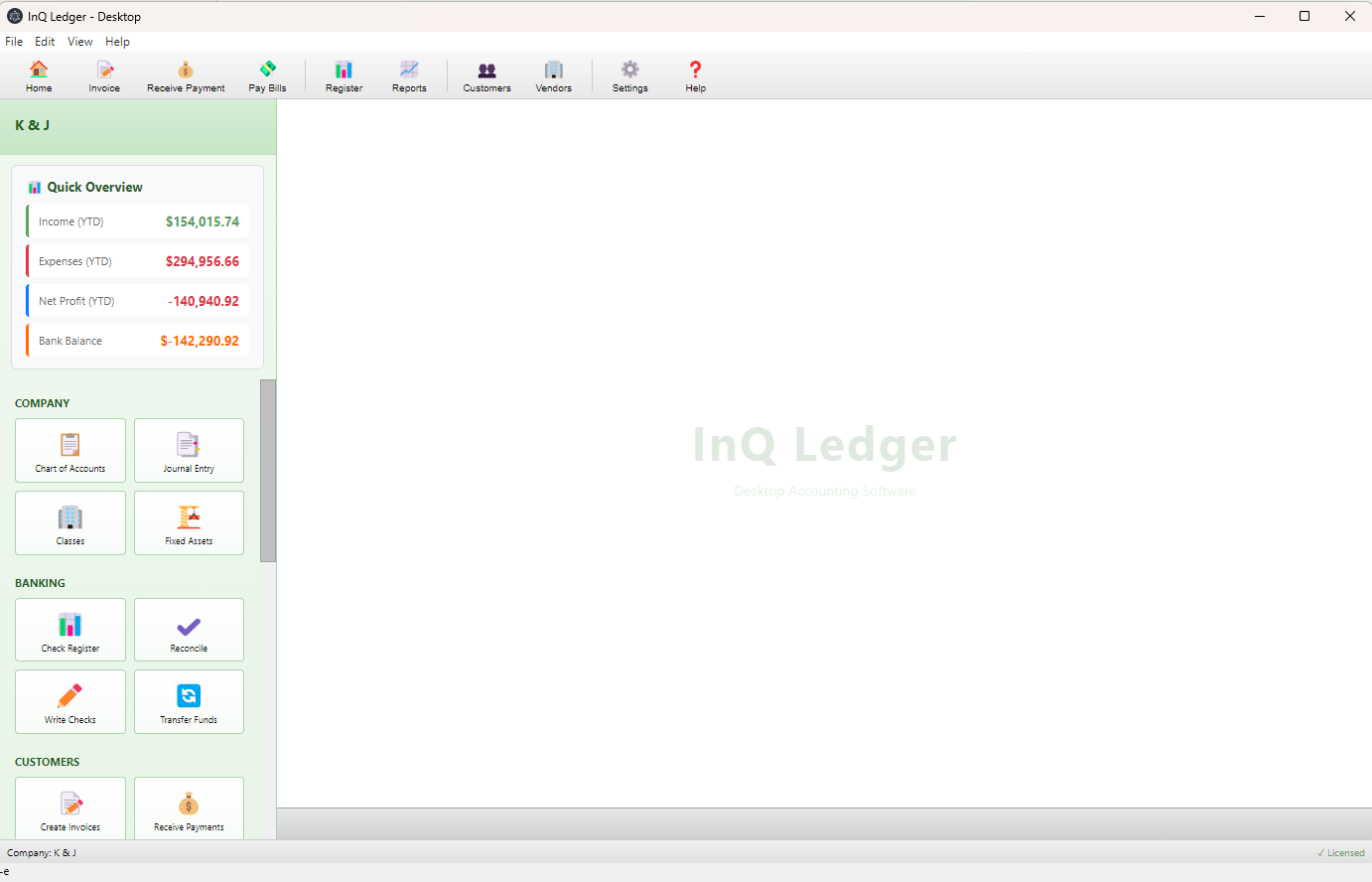
InQ Ledger — K & J · Home v1.0 · licensed
InQ Ledger desktop home view with company quick overview and module tiles
Quick Overview — YTD at a glance
Real desktop UI · no browser, no lag
12+ modules, one keystroke away
№ 02 — The QuickBooks Desktop sunset

QuickBooks Desktop ends May 2027.
Your data shouldn't.

Intuit has confirmed the sunset of QuickBooks Desktop. Once it's gone, it's gone — no new features, no updates, eventually no install. InQ Ledger reads your IIF exports directly and lands them in a chart of accounts that feels like home.

  • 01 Export your QuickBooks data as .IIF 2 min
  • 02 Import accounts, customers, vendors into InQ Ledger 3 min
  • 03 Set opening balances with the 5-step Quick Start wizard 10 min
  • 04 Reconcile and you're live — books in your hands again Same day
QB Desktop end-of-life
QuickBooks Desktop sunset: May 31, 2027
12
Months
14
Days
06
Hours
32
Minutes
What QB takes with it
New features · Security updates · Bank feeds · Payroll · Support hotline. What stays — a static install of an app that already lost its way.
§ 03 — Flagship feature № 1

A chart of accounts that matches the form.

When you create a company file, pick its tax type — S-Corp, C-Corp, Sole Proprietor, Partnership. InQ Ledger loads a chart of accounts that's aligned line-by-line with the corresponding return.

So at tax time, you're not translating "Office Supplies + Misc Admin + General & Admin" into a single 1120-S line. The line is the account. Numbers transfer. April closes itself.

  • Switch between entity types in seconds — every form's COA preloaded.
  • Run a P&L and you've effectively run a draft return.
  • Custom accounts welcome — but the defaults are already perfect.
IRS Form 1120-S
InQ Ledger COA
Income
Revenue accounts
1a.Gross receipts or sales
Gross Receipts / Sales
1b.Returns and allowances
Returns & Allowances
5.Other income
Other Income
Deductions
Expense accounts
7.Compensation of officers
Compensation of Officers
8.Salaries and wages
Salaries & Wages
9.Repairs and maintenance
Repairs & Maintenance
12.Taxes and licenses
Taxes & Licenses
14.Depreciation
Depreciation Expense
19.Other deductions
Other Deductions
§ 04 — Flagship feature № 2

Live Reconciliation — the rec is already done.

The check register has a Cleared column. Type Y as transactions clear the bank — daily, weekly, whenever you check the statement online.

When the paper statement arrives, you click Reconcile, enter the ending balance, and the difference is already $0.00. One click — Finish — and you're done. The ceremony of reconciliation, without the ceremony.

  • Bank balance and book balance stay shoulder-to-shoulder every day.
  • Catch discrepancies the day they happen, not on the 12th of next month.
  • Standard end-of-month reconciliation still available — it's just empty.
Operating Account · Reconcile · May 2026 3 of 24 days cleared today
DateDescriptionPaymentDepositClr
05/16 Stripe Payouts 8,420.00 Y
05/15 Pacific Power -218.40 Y
05/14 Gusto Payroll -14,206.55 Y
05/13 Office & Co. (Rent) -4,200.00 Y
05/12 Square Receipts 3,140.18 Y
05/11 Verizon Business -184.20 ·
Statement ending balance
$42,108.92
Difference
$0.00
Reconciliation balanced — ready to close ↩ Finish reconciliation
§ 05 — Capabilities

Everything else you reach
for, daily.

Built around accountant workflows, not bookkeeping checklists. Every module ships on day one; the obvious shortcuts are already wired.
F.01Core

True double-entry, not training-wheel.

Every transaction posts as splits. Real debits, real credits — the way you'd actually keep books if you had infinite patience and an Excel grid.

Journal entriesSplit linesClasses
F.02Imports

Bank CSV auto-detection.

Eight banks recognized on sight — Chase, BofA, Wells, Capital One and friends. Saved column-mapping templates handle the rest. No more wrestling row delimiters.

8 banks built-inTemplatesReconcile-ready
F.03Assets

MACRS depreciation, included.

3 / 5 / 7 / 15 / 27.5 / 39-year schedules auto-calculated. Disposals, gain/loss, YTD, accumulated, book value — built in. No add-on, no upcharge.

Auto-schedulesDisposalReports
F.04Payroll

Payroll CSV from eight providers.

Gusto, ADP, Paychex, Square, Rippling, OnPay, QB Payroll — drop the CSV in, get a clean journal entry out. The same way you wish your old software worked.

GustoADPPaychex+5
F.05Reconcile

Reconciliation that remembers.

Per-account history, prior-period statements, clear / unclear toggle on the register. Reopens cleanly — no "this period is locked" alerts at midnight on the 14th.

HistoryPer-accountRe-openable
F.06Data

Your data, on your machine.

Local SQLite — readable, backup-able, copy-paste-able. License expires? Read-only mode keeps every account, every report, every transaction visible. No hostage situation.

SQLiteOfflineRead-only fallback
§ 07 — Head to head

Compared to QuickBooks Desktop.

Fair and itemized. We point out where QB still leads — and where InQ Ledger already wins.
Feature InQ Ledger QuickBooks Desktop
Tax & reconciliation workflow
Tax-aligned chart of accounts Built-in — 1120, 1120-S, 1065, Sch C, 990 ×Generic — you map manually
Live Reconciliation (Y-cleared) Mark cleared as you go · 1-click finish End-of-month batch only
Licensing & platform
Price $20/mo or $199/yr ~$199/yr — until sunset
Future development Active — regular updates Sunset May 2027
License expired Read-only access to all data ×Hard lock
Data storage Local SQLite, portable Proprietary .QBW file
Company files per license Unlimited Unlimited
Setup & migration
Import from QuickBooks IIF import — accounts, customers, vendors N/A — is the source
Bank feeds (direct connect) CSV import supported now — live bank feeds coming soon Yes — via third-party service
Bank CSV import 8 banks auto-detected, saved templates Basic — rigid format required
Live payroll processing CSV import supported now — direct integrations coming soon Yes — with paid subscription
Payroll CSV import 8 providers — Gusto, ADP, Paychex… ×Not supported
Core accounting
Accounting method Cash basis only — accrual coming in v1.1 Both cash and accrual
Double-entry bookkeeping Splits, debit/credit Yes
Bank reconciliation Full history per account Full
Journal entries Full debit/credit lines Full general journal
Classes / departments Properties, departments, locations Yes
Memorized transactions Create, edit, delete templates Yes — with auto-entry
Fixed assets
Asset register Full — name, cost, date, type Basic — add-on required
MACRS depreciation Auto — 3/5/7/15/27.5/39-yr · free ×Paid Fixed Asset Manager add-on
Asset disposal Gain / loss calc included ×Requires add-on
Receivables & payables
Create invoices Line items, qty, rate Full — print, email, templates
Print / email invoices Print to PDF, pre-filled email draft Built in
Enter & pay bills (A/P) Basic — full A/P workflow coming in v1.1 Yes — full workflow
1099 tracking Report, flag, totals Full — print 1099s directly
Purchase orders / Estimates ×Not yet Q4 '26 Yes
Reports
Profit & Loss · Balance Sheet YTD, date range, class filter Full — incl. budget vs actual
Depreciation report YTD, accumulated, book value ×Add-on required
A/R & A/P Aging reports Built in — bucketed by age, color coded Yes
Cash Flow Statement Indirect method — operating, investing, financing Yes
Budget vs Actual Annual budgets per account, prorated by period Yes
Export to Excel 1099 report — others coming All reports
⚠️ Accounting method note: InQ Ledger currently supports cash basis accounting only. If your business is required to use accrual basis accounting (common for C-corps, inventory-heavy businesses, or businesses with over $27M in annual revenue), InQ Ledger may not be the right fit yet. Full accrual support is on our roadmap for v1.1. If you're unsure which method you use, ask your accountant — most small businesses and sole proprietors use cash basis.
Last updated · May 2026. We update this comparison every release.
№ 08 — In practice
I switched a 22-client book over the weekend. IIF on Friday night, opening balances Saturday morning, reconciled and live by Monday. I haven't paid rent for an accounting app since.
Drew K. · CPA · Eugene, OR — Beta user since 2025
§ 09 — Who reaches for it

Made for the people
who actually close the books.

If your work involves the chart of accounts at 9 PM on the 31st, you're our person.

CPAs & bookkeepers

Multi-client work without the per-seat tax. Unlimited company files, one license.

Property managers

Per-unit class tracking, fixed asset schedules, 1099 tagging on the contractors who fix the boilers.

Small business owners

QuickBooks Desktop migrants who refuse to rent their accounting software online.

Nonprofits

Restricted vs unrestricted funds via class tracking. Audit-friendly journal trails out of the box.

⚡ Limited Time — Charter Member Pricing

Be Part of Building It.
Get Heard. Get a Deal.

InQ Ledger just launched. We're looking for accountants who want in early, want a say in what gets built next, and aren't afraid to tell us when something's wrong.

Charter Members lock in $99/year — forever, as long as you stay subscribed. That's less than half the standard annual rate. In exchange, we ask for honest feedback: report bugs, request features, and help shape the product.

Normally $199/yr · Save $100 every year
Charter Price
$99
per year · locked in
$199/yr standard
🔒 Price Locked Forever
Stay subscribed and your rate never increases. When standard pricing goes up, yours stays at $99.
🎯 Your Feedback Shapes the Product
Report a bug or request a feature and we actually listen. Charter Members get priority on the roadmap.
🏷️ All Features Included
Same full product as the standard license. Unlimited company files, all reports, all imports, all updates.
§ 10 — One product · two ways to pay

Plain pricing.
No tiers.

MonthlyNo commit
$20
per month · cancel anytime
≈ $240/yr if held for 12 months
  • Every module, every report, every feature.
  • Unlimited company files.
  • All future v1.x updates included.
  • 7-day offline grace period.
  • Read-only access if license lapses.
  • Email support.
⚠️ Cash basis accounting only. InQ Ledger v1.0 supports cash basis only. Accrual accounting is on the roadmap for v1.1. See full comparison →
30-day money back
Refund within 30 days, no questions. We move with the conviction of our accountants.
Multi-license
Need 5 or more? Email sales@inqledger.com for firm pricing.
Secure checkout
Payments processed by Stripe. We never see your card.
§ 11 — Frequently asked

Common questions.

Can't find your question? Email hello@inqledger.com — a human replies.
When you create a company file, you pick its tax entity — S-Corp, C-Corp, Sole Proprietor, Partnership, Non-profit. InQ loads a chart of accounts that mirrors the corresponding tax return line-by-line. So your S-Corp file's accounts read like a 1120-S: Compensation of Officers, Salaries & Wages, Repairs & Maintenance, Taxes & Licenses… Run a P&L at year-end and you've effectively built a draft return. Tax prep becomes copying numbers, not translating categories.
In the check register, every transaction has a Cleared column. As things clear the bank — daily, weekly, however you check it — you type Y. When the bank statement arrives, you open Reconcile, enter the ending balance, and the difference is already $0.00. One click on Finish and the rec is closed. You can still do the traditional end-of-month batch — it's just usually empty by the time you sit down to it.
Yes. The app runs entirely on your machine using local SQLite — no internet required for daily work. We check your license periodically; if you're offline for more than 7 days the app continues in a 7-day grace period, after which it asks to reconnect once for verification. If your license expires, you keep full read-only access to all your data forever.
Absolutely — IIF import is built into the Quick Start wizard. We pull in your chart of accounts, customers, vendors, and transaction history. The Quick Start then walks you through opening balances and your first reconciliation, typically in under 30 minutes.
InQ Ledger Online is in active development with a target launch of Spring 2027. Every annual subscriber gets early access during the beta and a clear migration path — your local data is yours, and the online version reads the same schema.
InQ Ledger doesn't run payroll calculations — we recommend a dedicated provider (Gusto, ADP, etc.). What we do is import payroll journals via CSV from eight major providers, so your books reflect every pay period without manual journal entries.
Yes — you can open files from a network share. We don't yet support simultaneous multi-user editing the way QB Desktop does; this is on the roadmap for v1.4. For now, sequential access works well for most small firms.
Email sales@inqledger.com within 30 days of purchase. We refund the full amount via Stripe — usually within two business days. No support tickets to escalate, no exit interview.
InQ Ledger is part of the InQ Tax family of professional tools. The companies share infrastructure and a customer base of independent accountants and CPAs. Learn more at inqtax.com.
Not the desktop app — InQ Ledger today is Windows-only (Windows 10 and 11). If you're on macOS or Linux, we recommend waiting for InQ Ledger Online, which runs in any browser and is targeted for Spring 2027. Get on the early-access list →
№ 12 — Get started

Trial-balance ready in
one weekend.

Compare vs QuickBooks
🌿
InQ Ledger Support Ask anything — we reply instantly